


Milestone XProtect video management software has seen significant new capabilities in its latest 2026 R2 update. We broke down the key features and improvements, helping you get the most from your XProtect system. Read on to see what’s new.
Updated Maps
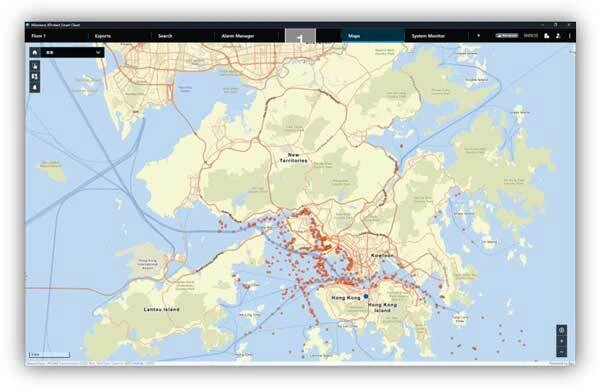
Available with the new Smart Client release in November 2026, maps provide location context for video surveillance, helping operators quickly understand incidents and respond more effectively. By combining XProtect device information with map backgrounds, custom site data, and external data layers, operators can create a richer operational view and show only the information relevant to the situation.
With Maps, operators gain immediate situational awareness, enabling them to act faster and with greater confidence across these capabilities. This delivers business value through shorter response times, higher operator efficiency, and stronger protection for people, assets, and operations.
Sticky Notes
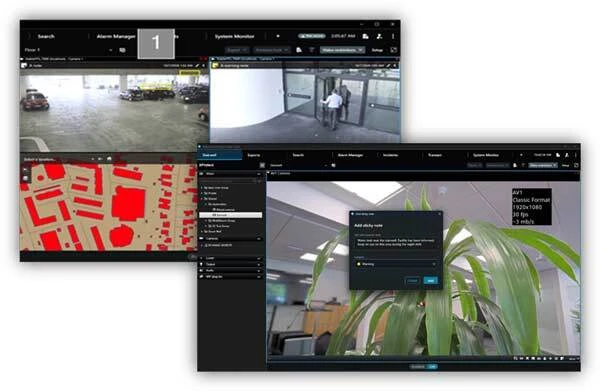
Sticky Notes lets operators add notes and operational information directly to camera views in XProtect Smart Client, with one note per camera. Site-specific information, shift handover details, operational instructions, and other context help operators understand and manage an area more effectively. Through the Management Client, users can centrally manage and configure Sticky Notes, including their colours, meaning users can:
- Add notes directly within camera views
- Support shift handovers and operational continuity
- Capture site-specific information and instructions
- Manage and configure notes centrally
Operators can more easily access site information, shift handover notes, and operational instructions within their working environment. This supports continuity across shifts and a shared understanding of the environment, with less risk of overlooking important information.
Permission Inheritance
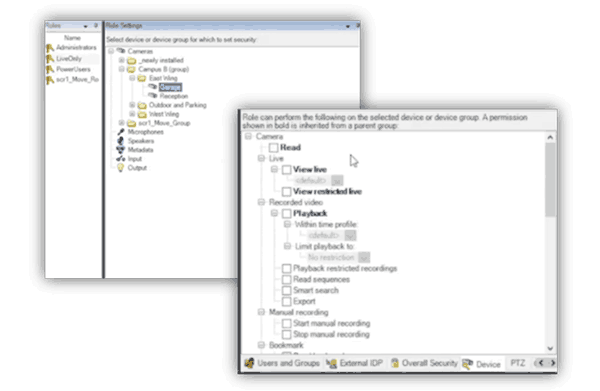
Permission inheritance allows newly added devices to automatically receive the permissions already assigned to the group they belong to. Instead of manually updating permissions every time a camera or device is added, administrators can define access rules once and have them applied consistently as the environment expands. Permission inheritance is part of the Management Client’s Role setting. Permissions remain aligned with established access policies as new devices are added to the environment. This reduces administrative effort, minimises manual configuration, and makes it easier to manage growing XProtect deployments.
Contact us to speak to one of our Milestone experts for more information.