

The IP Camera and IP CCTV Blog

The IP network camera online store and blog from Network Webcams

HOWTO: Register your Panasonic IP Camera with Viewnetcam.com Dynamic DNS Service

Panasonic Viewnetcam.com

Whenever a router is connected to the Internet it receives what is known as a public IP address. This is your identifier on the internet and is unique all over the world. However, internet service providers (ISPs) only have a set number of IP addresses which they can give to their customers. Because of this most ISPs will rotate their customers’ IP address each time they connect or reconnect to the internet, or as sometimes is the case, whenever they feel like it!

This can be a problem whenever you set up a camera using a domestic level broadband account. A fitting analogy would be to consider your home telephone number changing whenever BT felt like it. How would you be able to call home if you didn’t know your number?

There are however ways to combat this. You can often liaise with your ISP to secure yourself a static IP address, meaning your public IP address will never change, but you will often pay extra for this service.

The other alternative is to set up a dynamic DNS account. In order for this to operate a piece of software has to be set up on your router, camera or a local PC. This software periodically sends an update to the Dynamic DNS service to renew your IP address, keeping it current. It also has an added benefit of giving a meaningful name to your camera instead of an IP address making it easier to remember and will keep your camera connected to the Internet at all times, even if you change your ISP!

Many camera/router manufacturers support this feature in their devices. This article will look at how this is configured in a Panasonic camera using their free Dynamic DNS service: Viewnetcam.com.

This guide is suitable for the following Panasonic IP cameras:

  • BL-C1
  • BL-C20
  • BL-C10 (now discontinued, replaced with the BL-C111)
  • BL-C30 (now discontinued, replaced with the BL-C131)
  • BL-C111
  • BL-C131
  • BB-HCM311 (now discontinued, replaced with the BB-HCM511)
  • BB-HCM331 (now discontinued, replaced with the BB-HCM531)
  • BB-HCM511
  • BB-HCM515
  • BB-HCM531
  • BB-HCM381 (now discontinued, replaced with the BB-HCM580)
  • BB-HCE481 (now discontinued, replaced with the BB-HCM581)
  • BB-HCM580
  • BB-HCM581

Viewnetcam.com

Viewnetcam.com is an online service provided free by Panasonic which will automatically update your public IP address when your ISP changes it. The way it works is simple. The system is built into your Panasonic IP camera and when activated, your camera will make periodic connections to the Viewnetcam service supplying its current IP address.

We are basing this HOWTO: guide on the Panasonic BL-C10 camera. Other models have slightly different options and terminology but are essentially the same.

Step 1

We will already assume your camera is configured and you can access it on your local network and externally from another location over the Internet.

Step 2

Log into your camera as an administrator and enter the setup pages by clicking on the ‘setup’ tab.

Step 3

In the menu down the left hand side you will see a link which will either say ‘Viewnetcam.com’ or ‘Dynamic DNS’ depending on your model of camera. In our example this link says ‘Viewnetcam.com’. Click this link to configure the dynamic DNS settings.

Step 4

The page shown will be the page where you activate the Viewnetcam service in the camera.

Note: In some Panasonic models you are given the choice of using the Viewnetcam service or using a third-party Dynamic DNS service such as DynDNS.com. We would suggest using the Viewnetcam service unless you experience difficulty with it.
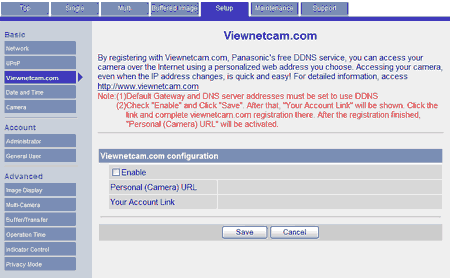
Viewnetcam setup page

Click the checkbox marked ‘Enable’ and click the ‘Save’ button to activate the Viewnetcam service.

You should get a message saying “Success!” and a button which will link you back to the previous page titled ‘Go to Viewnetcam.com page’. Click this button to return to the previous page.

Step 5

Now that your camera is activated you need to register with the online service. You do this by clicking on the link titled “Your Account Link” which is a specific link to take you directly to the Viewnetcam.com website.

Click the ‘new registration’ link.

You will need to enter your current email address, set a password and enter some personal information. Once this is done click “I agree”. You will then be asked to choose a name for your DNS address. Enter what you wish into the textbox. Remember that there can be no spaces and must contain only letters or numbers. Once this is entered click “choose”.

Step 6

And that’s all there is to it!

Use your new Viewnetcam address to access your IP camera from anywhere across the Internet.

More information

Panasonic Viewnetcam.com

Using the initial installation software to set up Viewnetcam.com

| Trackback

73 Comments so far

  1. John February 28th, 2008 10:32 pm

    It is wierd that I have to have my home pc logged onto the camera and only then can i remotely access it from outside internet - Why does my homepc have to be on and logged into the viewnetcam?

  2. Greg February 29th, 2008 9:50 am

    Your home PC shouldn’t have anything to do with it John. As long as your camera and router are powered the Viewnetcam service will run independently of any PC on the network.

  3. Mohamed February 29th, 2008 3:52 pm

    May I install the BL-c111 firmware in my BL-c10 ?
    Are there any improvement if so ?

  4. Greg February 29th, 2008 3:59 pm

    No, that wouldn’t be possible I’m afraid.

  5. JOHN March 3rd, 2008 1:10 am

    I went and had to upgrade from DSL to Cable modem, so i have to redo all my hard work setting this camera up! I am at the point where:
    The address above will be shown on Status page in the Maintenance section.
    Opening the Viewnetcam.com registration page. Please wait. Then continue the setup via the DynamicDNS setup screen.

    The viewnetcam page is not opening - Is there a link to get to this page w/o waiting for this to bring it up?

  6. Greg March 3rd, 2008 9:56 am

    Hi John,

    As the Viewnetcam service is handled solely by the camera changing a router shouldn’t have any impact. Once the camera is reconnected to the cable router is should have started communicating again with the viewnetcam service, unless during the process you reset all the settings in the camera too.

  7. Paul March 12th, 2008 2:11 pm

    I have -C131 camera, wireless router, and DSL modem. Viewing works fine wirelessly from home network. Have registered with viewnetcam; account is valid and DDNS is active. However, my ***.viewnetcam.com address always responds with page-not-found error. Have reads lots of FAQ’s on this topic, learned more about IP’s than I ever wanted to know; still can’t fix the problem. This probably isn’t available, but I’d love a straightforward checklist progression of types of settings to validate for each element(viewnetcam service, router, & camera) to allow internet viewing. Thanks.

  8. Greg March 13th, 2008 11:50 am

    Hi Paul,

    Here’s some trouble-shooting tips:

    1) Open a command prompt and ping your viewnetcam address by using the command “ping yourcameraname.viewnetcam.com” where ‘yourcameraname’ is your personal viewnetcam name. When you ping this it will show the public IP address associated with the viewnetcam entry. Now compare this to your real public IP address by visiting the website www.whatismyip.com from the same network the camera is on and if the addresses match then everything with viewnetcam is working and is ok.

    2) Also check the firewall rules in your router. No camera can be seen from the outside world with a rule added to the router to open access. You can gain instructions for every router type at www.portforward.com.

    3) Finally it’s worth noting that it could be extremely normal to not be able to access your camera from the same network using your viewnetcam address. This is a public address and most routers will block any request made by the same network trying to come back on its self. This is known as NAT loopback and is very common. In these circumstances you should test the external connection from another location and use your external address from there and use your local address for when you are on the same network as the camera.

  9. Paul March 13th, 2008 1:52 pm

    Thanks for the tips, Greg. Surprisingly, my viewnetcam began working today from the same external-network pc that had failed on multiple previous attempts. I don’t know what changed. I do appreciate your feedback and will run through your suggestions anyway to try to becmoe a little smarter for the next time.

  10. kevin April 15th, 2008 1:50 pm

    I brought a used blc-131 camera and when i went to reister with the online service viewnetcam. the previous owner’s email address cam up. How do I change the name and set my own DNS address of my choice.

  11. Greg April 15th, 2008 2:22 pm

    Contact Panasonic. They will be able to reset the Viewnetcam account for you:

    Tel: 0870 907 0357 (Option 2)

  12. x-man May 21st, 2008 5:24 pm

    Need some serious help! I tried unblock anonymous req from my router and portforwarding. But i can’t access my viewnetcam.com website from my work computer for the life of me! pls help!
    i have the wrt54g router w blc131 cam.

    thanks in advance

  13. Greg May 21st, 2008 5:30 pm

    Your work may be blocking access? I’m sorry there’s not enough information to provide any further help.

    Try asking in our forums: http://forum.networkwebcams.com/

  14. Paul June 24th, 2008 5:24 pm

    I’ve followed all the instructions and cannot get my viewnetcam domain to work. My router is netgear 384. I have remote wirless working within my home network only. I have successfully registered my domain and it is “active”. When I enter my domain into a web browser it asks for my user name and password. However I don’t have a username do I because my viewnetcam id is an email address right?

    I try to set up my netgear dns registration but that fails too. It says username and/or p/w are incorrect. But again - viewnetcam does not give me a username…. I have tried both netgear dns registration and no registration… no difference.

    Regards

    Paul.

  15. Greg June 24th, 2008 5:52 pm

    double-check the password it is asking you for is actually the camera. If it’s the camera is will say something along the lines of “Please enter password to log in as a General User”. If it doesn’t say “General user” then it’s not the camera and will most likely be your router.

    Be aware that you probably wont be able to use your Viewnetcam.com address from your local network anyway. You normally have to use your ‘local’ IP address on the local network and your Viewnetcam address when you access the camera from the Internet.

    Also you can’t use the Viewnetcam details directly in a Netgear router. It’s actually asking for details from another free dynamic DNS service which you can register for at www.dyndns.com

    Rememeber you may have to enter some port-forwarding rules in your Netgear router too. Check this article for help:

    http://www.networkwebcams.co.uk/blog/2007/10/15/how-to-set-up-external-access-to-your-camera-using-a-netgear-router/

  16. Paul June 25th, 2008 10:59 am

    Hi Greg,

    Thanks very much for your quick response. I have progressed further - I didn’t set the camera port to the same as that in the example (4440)… I’ll match this up tonight so that when I get back to work tomorrrow I’ll see it….

    My netgear 684 does not have “Port Forwarding” on the advanced menu. I think your instructions are the equivelent to setting up port forwarding right?

    I’ll confirm everything is working tomorrow - I hope :-) Thanks again!

    Paul.

  17. Greg June 25th, 2008 11:21 am

    Some netgear routers can have slightly different terminology in the menus. Try going to http://www.portforward.com/english/routers/port_forwarding/routerindex.htm and find the model number which matches your router.

  18. Dan June 26th, 2008 2:45 am

    I have setup and registered my camera and it works fine. I have setup a 2nd camera and I can access both from my local PC’s but I cannot get to my 2nd camera via the web. I have setup the 2nd camera but when I try to access via the web I get an error, 14/12002, from that camera. Do I have setup put in a wan address when I setup that 2nd camera or register that camera or setup another viewnetcam address?

  19. Paul June 26th, 2008 11:06 am

    Hi Greg,
    Me again from June 25th. Still no luck. We have used Wire Shark to track the flow of packets between routers. My camera is on default port 8080. I have set the service on Netgear also to 8080 and added/enabled it on the Fire wall rules. Wire Shark says the service is unavailable when we try to accesss domain.viewnetcam.com:8080. If we try domain.viewnetcam.com:80 or domain.viewnetcam.com we don’t get the “no service” indication. So it looks like the service exists but the router thinks its dead (from the outside). However the wireless at home (from the inside) works fine. I have also enabled Port Forwarding on the camera too. Slowly getting there……. cheers Paul.

  20. Greg June 27th, 2008 1:29 pm

    Dan:

    In your second camera: Go into the network settings and change the HTTP port number to something non-standard such as 4440. Then disable the viewnetcam service on the this (2nd) camera.

    To access it, use your original viewnetcam address and then add the non-standard port-number (in our example we would add ‘:4440′) to access the second camera from the Internet.

  21. Greg June 27th, 2008 1:33 pm

    Paul: My guess is that it’s working fine. How are you testing your viewnetcam address? If you test it from the same local network as the camera you might find it will never work. That’s called NAT loopback and the router is blocking it. Have someone from the outside to test the viewnetcam address from another location over the Internet (remembering to add :8080 to the end of the address as 8080 is not the default port of the camera)

  22. Paul June 28th, 2008 4:08 pm

    Greg,
    I’m testing externally to my home network. It still doesn’t work. I see from the camera’s maintenance page that Port 80 is used. Fine. But when I add the service onto netgear 684 it won’t let me saying the port is used by something else. That’s fine too, but I cannot see how to change the default port setting of the camera. Do you know how please? Are you sure this equipment works?…. :-) Paul.

  23. Paul June 29th, 2008 12:52 pm

    Got it working Greg!! Hurrar!
    You cannot configure the Port address to force it to use a specific port, the camera finds/uses an unused Port auromatically when Port Forwarding is first enabled… The maintenance page tells you the Port it is using. Netgear 684 didn’t like me entering “80″ but did accept “0080″ :-( then it showed up as 80 in the service table… Thanks for your assistance. Paul.

  24. Darin June 29th, 2008 5:11 pm

    Great information…thanks a bunch.

    I recently installed two cameras (wireless - BL-C131A and wired version) and all seemed to be cool until the morning after. I tried accessing my viewnetcam page and the cameras would not load. I could view them locally but not via my viewnetcam account. Since then, I’ve had to restart the cameras each morning in order for them to work. Not sure why, but it appears that they simply stop working at some point.

    Any advice would be greatly appreciated.

    Darin

  25. Greg June 30th, 2008 10:05 am

    Hi Darin,

    It may be that they stop working when your public IP address changes. Try going into the viewnetcam settings in the camera and increasing the frequency of the updates. That my update the service quicker for you.

  26. Cary July 10th, 2008 10:01 pm

    Help!
    I can view my viewnetcam page (on boat) from my work PC and from my kids laptop at home, but not my laptop at home.

    I enter the correct details and the page loads but all that is shown is a blue line across the top of the page.

    Probably something really silly, but it’s got me!!!

  27. Greg July 11th, 2008 10:20 am

    If your laptop at home is on the same network as your camera then it could be that you are suffering from NAT loopback. This is when your router blocks a request made to access the same network using the external address going out and then coming back in again. It’s fairly common. What you have to do is use a local IP address on the local network and a viewnetcam address from other locations on the Internet.

  28. mari August 9th, 2008 8:47 pm

    HI
    I WANT TO GOUT FALOW SYSTEM TO MY CLIENT
    COULD YOU GUIDE ME PLAES
    I WANT TO CONNECT A NETWORK WIRELESS CAMERA AS BL-C30 TO GPRS MODEM AND SEND ONE IMAGE PER MINET TO MOBILE PHONE
    PLEASE TELL ME THAT I SHALL USE WICH PART NUMBER AND WICH WAY
    PLAES INTRUDUSE YOU’R PARTNER IN IRAN
    THAMK’S ALOT

  29. Maric October 3rd, 2008 11:35 pm

    Hi,
    I got network camera BL-C131A and sometime I can access online just sometime. Called custamer support and did port forwarding. It worked while we were talking on the phone. I logged off and tried to log in again at work but it doesn’t work again allthough I could log in but just sometime. Getting massage that server is not responding or stoped responding. Please help…What should I do?

  30. Greg October 6th, 2008 12:06 pm

    Take a look at this article with help on accessing your camera externally: http://www.networkwebcams.co.uk/blog/2007/10/22/howto-port-forwarding-101/

  31. Dave October 8th, 2008 12:17 pm

    Hello. I am using a BL-C131a in wifi mode with a Zyxel prestige adsl modem/router. All is well through the viewnetcam.com service, however, at work it is blocked. This could be from the port extension at the end of the viewnetcam.com address. Is there any way around this? Perhaps a paid camera server service which would not require adding the port number? Thanks for any info.

  32. Oli November 19th, 2008 11:04 pm

    Hello,

    I am using a BL-C30 and I used to be able to view camera over the internet via DDNS Viewnetcam. For some reason, everytime I go to the camera link, it goes to my router home page only. Seems it is not port forwarding, even though it is enabled. My router is Siemens SE587, firewall disabled.

    Any advice?

    Cheers,

  33. freddy November 24th, 2008 5:48 pm

    Hi,
    I got network camera BL-C131A and it works fine at home over the same network, but when I’ve tried at work using viewnetcam URL it give me a page of
    Grandstream Device Configuration with password option. and I don’t have a password for that. Please help. From where I can get that password.

    Thanks, in advance.

  34. Greg November 24th, 2008 6:04 pm

    You need to set up a firewall rule in your router. This is known as port-forwarding. Check this article for more information: http://www.networkwebcams.co.uk/blog/2007/10/22/howto-port-forwarding-101/

  35. Luis January 22nd, 2009 9:23 pm

    I update my BL-C10 camera for a BL-131A and I sell the BL-C10.
    I reset the BL-C10 but the new owner can not change the name and personal camera url in the setup menu. How can he change it? can the BL-C10 be completly reset?

    Best regards
    Luis from Mexico

  36. Greg January 23rd, 2009 10:19 am

    If you contact Panasonic they can reset the personal camera URL in the camera. It can’t be done from the camera.

  37. Shiheliu February 13th, 2009 5:47 am

    Hi, I have two BL-131A camera and setup very well. However, I can’t view them at same viewnetcam website. I have to have two web page to view them separately. Could you please let me know how to setup multi camera screen? Thanks so much! Shihe

  38. Sean February 25th, 2009 2:32 pm

    Shiheliu,

    I’m not Greg, but maybe I can help. When you go to the multi-camera setup, make sure the address listed for the second camera is JUST xxx.viewnetcam.com (NO http://) and then the port number for that camera, mine is 50001. You can NOT use the internal IP for the second camera. (192.168.x.xxx).

  39. Sean February 25th, 2009 2:33 pm

    Greg,

    Can these cameras be mixed and matched and still work on the SAME viewnetcam page. i.e. Can I have a BL-131A, BL-111A, AND a BL-C1 and have them show together on the Multi Screen.

    Thanks.
    Sean

  40. Richard March 13th, 2009 9:17 am

    Hi! I have two cam’s BL-C131 and BL-C30 the 131 works well but the c30 over night turns off so that every morning i have to restart it.
    http://scillywebcam.viewnetcam.com:50029/CgiStart

  41. Greg March 13th, 2009 10:13 am

    Sean,

    Yes you can do that. What I would suggest though is that if you have multiple cameras on the same network connection you should give them different port numbers (such as 8080, 8081 etc.) and only set up one of your cameras with the Viewnetcam service. This way you can use 1 viewnetcam address for all your cameras by changing the port number at the end. e.g. mycam.viewnetcam.com:8080, mycam.viewnetcam.com:8081 etc.

  42. Greg March 13th, 2009 10:16 am

    Richard,

    My first guess is a wireless issue. Is the BL-C30 further away from the wireless access point than the BL-C131 or in an area with more objects which could cause interference?

    See our guide to wireless interference: http://www.networkwebcams.com/ip-camera-learning-center/2008/05/09/howto-prevent-wireless-interference/

  43. Richard March 13th, 2009 10:20 am

    Sorry!,I should have added, ” can you help me with this issue ?
    cheers
    Richard

  44. Richard March 13th, 2009 10:21 am

    Ooops! that was qwik!!
    I already had these problems with this Camera before I got the other one.

  45. Richard March 13th, 2009 10:23 am

    seems to go off at midnight, I had it sorted a while ago but had to do a factory reset and forgot how I resolved it.

  46. Richard March 13th, 2009 10:34 am

    Sorry about all those posts, I was getting carried away! No its in the same place as the other camera, I’ve moved them both around to different places and its always the c30 that goes off line, like I said, it seems to be around midnight, I think i sorted it before by adjusting the “Operation Time” but I don’t remember how i did it, I’ll just keep twiddling it and see how I get on!!
    cheers

  47. Enrico March 25th, 2009 10:38 am

    Hi!
    I noticed that in my BL-C131 dynamic dns settings there’s also an option to set a third party dynamic dns instead of viewnetcam.. anyone knows how can I configure my BL-C131 to use dyndns.com (wich I prefer to viewnetcam)? I understand that I could simply configure my router to use dyndns isntead, but I can’t do it for technical reasons.

    —————————————————–

    For the curious ones, my “security router” is behind another “adsl router” and, whilst the cameras connected to it report the correct public ip address to viewnetcam, the security router doesn’t report the right ip to dyndns

    Internet

  48. Tom Frew May 6th, 2009 12:12 pm

    hi, i’ve set up my camera and its all works locally and have registered with viewnetcam.com but when i try to login to domain.viewnetcam.com it asked for a username and password. I’ve tried everything i can think of but no success. It suggests generaluser/administrator but neither work as a user name.

    Any advice would be greatly appreciated.

    Tom

  49. John V May 7th, 2009 3:08 pm

    I got the camera (BL-C1A) hooked up and worked local fine. Tech service fixed the web problem. Had to change the camera port 80 to 5000 (it was the same as the router) Now everything works fine if I put Mycamxxx.viewnetcam.com:5000 The only problem is the green light on the camer is now fliasing red. Any issues with this or just ignore the light.

  50. Greg May 7th, 2009 5:26 pm

    @Tom:

    Hi Tom,

    That definitely sounds like the camera you are trying to connect to. You should just enter the username and password for your camera in the boxes shown.

  51. Greg May 7th, 2009 5:30 pm

    @ John V:

    Unfortunately I don’t have one to hand to test John but I think the LED sounds like it’s flashing to indicate the camera is being accessed. Check the LED settings in the camera. There might be the option to turn it off completely or leave it on standard green light.

  52. John V May 8th, 2009 12:43 pm

    I think I found the answer. I went to the maintenance page and saw a lot of errors on UPnP, so I disabled it from the setup page. The light went out after a restart and evething looks ok. Next step is to add another camera.

  53. tman June 20th, 2009 2:51 am

    camera works fine

    but work lapper will not connect to home wireless network now??

  54. Greg June 23rd, 2009 9:09 am
  55. richard murray July 23rd, 2009 9:31 am

    when it asks for username, is this e-mail I used to set up the camera. (I am getting the password/username from xxxx.viewnetcam.com)

  56. Greg July 29th, 2009 9:59 am

    @Richard:

    It’s asking for the username and password for the camera. It’s asking you to log in before it allows you access.

  57. Grant August 25th, 2009 9:47 am

    Hi,

    I have a BLC1 and a BLC20.

    1) Can I have both of them registered to the same viewnetcam domain? And can i get both of them working on the same network?

    2) I have been able to set up my BLC20. However, I can only randomly access it through the internet. Sometimes I can access it and sometimes I can’t, without changing anything. Do you have any idea what the problem is?

    Thanks in advance
    Cheers

  58. Greg August 26th, 2009 9:52 am

    @Grant:

    1) If you go through the viewnetcam setup process with both cameras then you will have to use 2 different viewnetcam addresses, one for each camera. To get around that disable the viewnetcam service in one of your cameras and then you can access both cameras using the same viewnetcam address (but bear in mind both cameras will require a unique port number otherwise you won’t be able to differentiate between them)

    2) This could be a whole range of things. I assume that the camera becomes accessible without you performing any action so my first guess would be something to do with the wireless connectivity. Could the camera being losing its wireless signal? How far from the router is it? Is there anything which could be causing the signal to drop? (see our short guide on combatting wireless interference: http://www.networkwebcams.com/ip-camera-learning-center/2008/05/09/howto-prevent-wireless-interference/)

  59. Grant August 26th, 2009 11:51 am

    Thanks,

    2) I am using the BLC20 with a wire, so should be a diff problem. I can ping my viewnetcam address and i get a request timed out response, which tells me that at least the camera is there. I do notice that the IP changes quite frquently. Any idea what I can try to get the camera to work?

    Cheers

  60. Greg August 27th, 2009 11:08 am

    @Grant:

    Ok, it sound like your IP address (which is supplied by your ISP) is changing more frequently than the viewnetcam service can keep up with.

    Couple of things to try:

    1) Go into the dynamic DNS settings in the camera (setup pages) and in the viewnetcam settings there should be an ‘update period’ which you can change. Try to make the updates shorter so that the viewnetcam service is updated more frequently. It could be that your IP address changes and it’s currently taking an hour before the camera updates viewnetcam with the new address.

    2) Speak to your Internet service provider and see about getting a static IP address. This means your IP address will never change giving access to your camera constantly. Some ISP’s charge a nominal fee for this service.

  61. Grant August 27th, 2009 1:06 pm

    Hi,

    Thanks for the suggestions. Unfortunately, there is no option to speed up the ‘update period’ under the dynamic DNS settings page for my camera BLC20

    Have you heard of something called www.no-ip.com? Will this help solve my problem, if it is the IP changing to frequently? If so, how does this no-ip thing work?

    Cheers

  62. Greg August 28th, 2009 8:53 am

    no-ip.com is just an alternative dynamic DNS service to viewnetcam.com.

    Take a look in your router and see if it supports a dynamic DNS service. You can maybe run that from in there instead of in the camera.

  63. Chris November 6th, 2009 6:15 pm

    Anyone have any idea how to stop the controls causing pop-ups when clicking, the camera pans but also opens a new window, any help gratefully recieved, I’ve tried changing the “target” properties. see what I mean: http://www.seetorbay.com/external/webcams/modelvillage/maincam.html

  64. Magno December 18th, 2009 1:15 am

    I have a problem with my ZyXEL p-600 Series router, when I try to set the Dynamic DNS, I can not get viewnetcam.com the only service provider I can get is WWW.DynDNS.ORG. Is the only thing left for my Panasonic BL-C131A to get ready. Can you HELP me please.

  65. nelson gomez January 1st, 2010 7:04 pm

    I forgot the user and password to login as Administrator
    is not the same as my viewnetcam account right ?
    please let me know
    Best regards,

    Nelson Gomez
    President
    ANGSA

  66. Greg January 11th, 2010 12:34 pm

    @nelson gomez:

    Yes, the login details for the camera are separate from the login details for viewnetcam.com.

    If you have forgotten the login details for the camera you will have to reset back to factory settings and configure your camera from scratch again.

  67. JT January 30th, 2010 6:17 pm

    I recently purchased the panasonic BL-C131A and installed it as a nanny cam. I was able to get the camera working with no problems. I can view the camera wirelessly from my laptops at home, my mother-in-law can view the camera from her home. However, neither my wife nor I can access the camera from our work computers. We both get the “webpage cannot be displayed message”. I can access the camera from my ipod touch at work (no sound) through the public wireless network there. Why can’t we access the camera from work our work computers? Does it have something to do with the firewall at work? Is there something I can change to get around this? I originally had the port for the camera set to 50000, changed it to 5000, because I noticed in the firewall settings on my work computer that 5000 - 5020 were listed as exceptions to blocked ports. I still can’t view the camera. My router is a Linksys WRT310N. Please help.

  68. Greg February 1st, 2010 10:22 am

    @JT:

    I would guess it’s your work blocking it.

    Try putting the camera on port 80 as this port is used for web traffic and shouldn’t be blocked.

  69. Keith June 5th, 2010 3:35 pm

    I’m having difficulties with getting my router (BT HomeHub) to authenticate the DDNS at viewnetcam.com. It requires Username & password… when logon onto www.viewnetcam I use e-mail and a password and I have a camera name within the Domain name…. So which is the username for the router ??? The camera name or my e-mail address…. I only have one password so I guess it must the same as logging on…Tried all combinations without success… I can ping “[URL REMOVED]” OK , so I guess the name is registered… I have put port forwarding/application sharing on the router for 50000 and given it a name….Anything else I should do ??? Thanks in anticipation

  70. Greg June 8th, 2010 9:48 am

    @keith:

    Your camera is working fine. What you are suffering from is something called NAT loopback and it’s very common. What this means is that if you are on the same local network as the cameras and attempt to use your external IP address (known as the public IP address, in this case the Viewnetcam address) then you will find that the router will not like it and what is probably happening in your case is that the router is directing you to its own home page instead of the camera.

    What you need to do is use the local IP address for the camera when on the same local network (this will most likely start with 192.168…) and use the Viewnetcam.com address from any other computer on the Internet.

    P.S. As your camera is configured for anonymous access I have also removed the URL in your comment as this leaves it wide open to the public. If you don’t want to leave it open you can turn off access for guest users in the setup pages under the “administrator” menu option.

  71. mina June 19th, 2010 8:19 am

    i have forgotten login password for my camera in viewnetcam.com
    need help…

  72. zeshan July 2nd, 2010 11:03 pm

    i want to new account how we can get plzzzzzzzz help me.

  73. Greg July 5th, 2010 9:15 am

    @mina, @zeshan:

    You will need to contact Panasonic to have the Viewnetcam account reset.

Leave a reply